Summary: LINE plans to end support for older versions of the LINE app on November 4, 2026. If your LINE app is older than 14.6.3 on iPhone or iPad, or older than 14.4.6 on Android, it will no longer be supported. LINE says you can keep using it if you keep your phone’s operating system (OS) and the LINE app up to date. If your phone runs iOS 14.8.1 or earlier, or Android 7.1.2 or earlier, you need to update the OS first. This guide shows how to check your version in one minute and what to do before November 4.
In Japan, LINE is used for almost everything: chatting with friends, messages from your child’s school, your landlord, your workplace, and even some city offices and shops. So it is worth checking your phone (and your family’s phones) now, not on the day.
What is changing
| Item | Details |
|---|---|
| Date | November 4, 2026 (planned) |
| Versions losing support | LINE app earlier than 14.6.3 (iOS / iPadOS), earlier than 14.4.6 (Android) |
| OS needed for LINE on phones and tablets | iOS / iPadOS 15.0 or later, Android 8.0 or later |
| Apple Watch | watchOS 8.0 or later, with LINE 14.6.3 or later on the paired iPhone |
Checked: 2026-10-29. Source: LINE Help Center (notice updated October 16, 2026).
Who is affected
- People who have turned off automatic app updates and have not updated LINE for a long time.
- People using an old iPhone, iPad or Android phone that is stuck on iOS 14 or Android 7 or earlier.
- Family members, often parents or children, using an old “hand-me-down” phone.
If your LINE app updates automatically and your phone is a few years old or newer, you are probably not affected. But checking takes less than a minute.
When you will notice it
The change is planned for November 4, 2026. LINE’s notice does not give a detailed list of what stops working on an old version, so the safest plan is simple: finish your update before November 4. If you need a new phone, give yourself a few days, because moving LINE to a new device works best when the old phone still works and your chat backup is fresh. If you plan to visit a mobile shop, bring the old phone, its charger and your LINE login details (phone number, email address and password). Shops can help with the phone itself, but your LINE account details are yours to keep, so write them down somewhere safe beforehand.
Check your LINE version (1 minute)
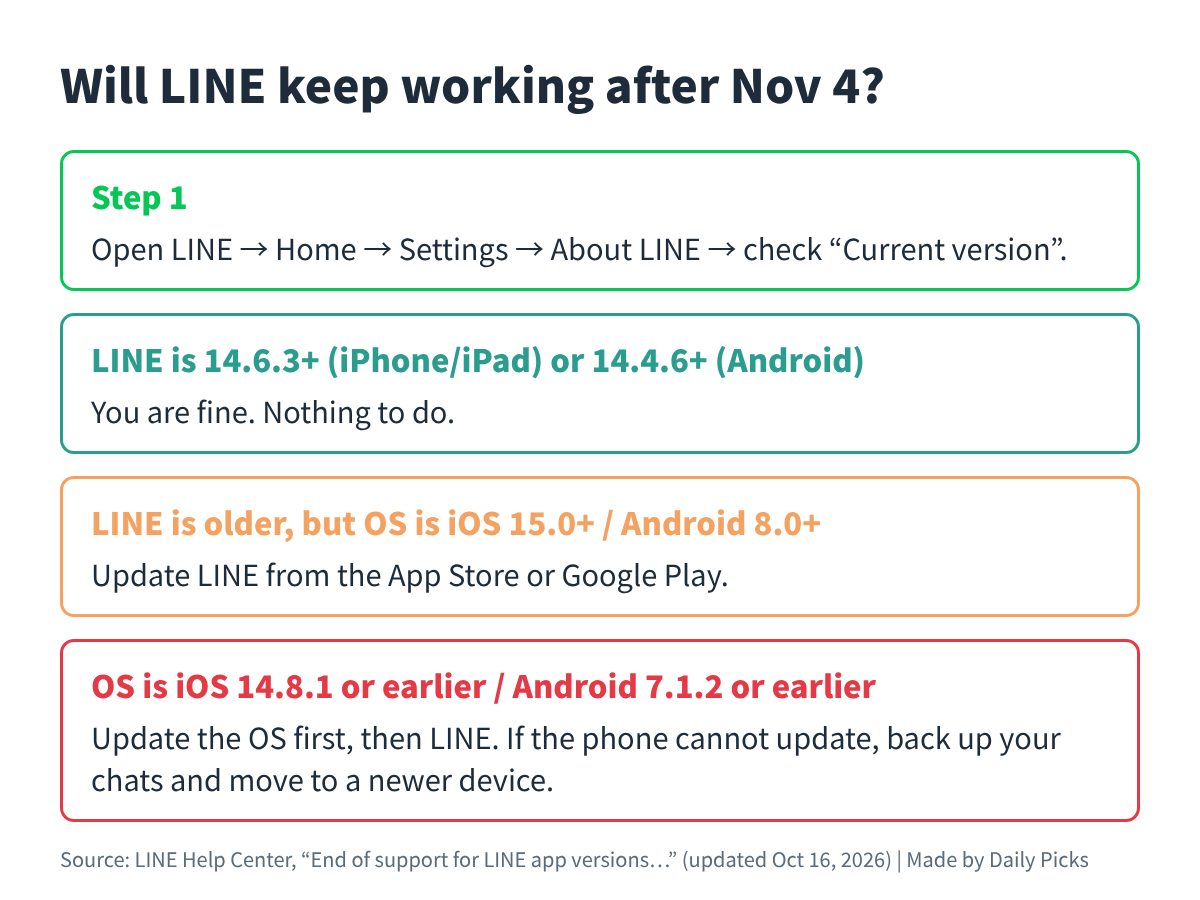
- Open LINE and tap Home.
- Tap Settings (the gear icon).
- Tap About LINE and look at Current version.
If the number is 14.6.3 or higher on iPhone/iPad, or 14.4.6 or higher on Android, you are fine. If the menu is shown in Japanese on your phone, the path is 「ホーム」→「設定」→「LINEについて」→「現在のバージョン」.
What you can do now
- If only LINE is old (your OS is iOS 15.0+ or Android 8.0+): open the App Store or Google Play and update LINE. LINE says that if you cannot update the app on a supported OS, you should contact your OS provider (for example Apple or Google).
- If your OS is old (iOS 14.8.1 or earlier, Android 7.1.2 or earlier): update the OS first in your phone’s settings, then update LINE to the latest version.
- If your phone cannot update to iOS 15 or Android 8: LINE suggests using LINE on another device with a supported OS. Before you move, back up your chat history in LINE so you do not lose your chats, and keep your phone number, email and password registered in LINE ready for the transfer.
- Apple Watch users: keep watchOS at 8.0 or later and update LINE on the paired iPhone to 14.6.3 or later.
Watch out for fake “LINE will stop” messages
News like this is often used by scammers. A message that says “Your LINE will stop working, tap here” and asks you to log in or enter personal details is not how updates work. Update LINE only from the App Store or Google Play, and check announcements on the LINE Help Center yourself. Our guide Fake SMS and phishing in Japan: how to spot them explains common tricks and what to do if you already tapped a link.
If you are not affected
You do not need to do anything. Keeping automatic updates on for LINE and your OS means you will not have to worry about the next end-of-support date either.
FAQ
Q. Will my chats disappear on November 4?
A. LINE’s notice says support ends for older versions. It does not describe what happens to chats. To be safe, update before November 4, and back up your chat history before changing phones.
Q. My iPhone cannot install iOS 15. What now?
A. LINE suggests using another device that runs a supported OS. Back up your chats first, then transfer your account to the new phone.
Q. I use LINE on my PC. Is this the same?
A. This notice is about the LINE app on smartphones, tablets and Apple Watch. Check the LINE Help Center for the PC version.
Q. I got a message saying I must update via a link. Is it real?
A. Do not tap the link. Update from the App Store or Google Play only.
Related reading
日本語で読む:古いLINEアプリは11月4日にサポート終了|自分は対象?バージョンの見方と今やること