Summary: Fake text messages (SMS) that pretend to come from delivery companies, banks, the tax office or the police are common in Japan. This kind of phishing by SMS is often called “smishing”. This guide shows the main types, what official organisations say they do not send, what to do if you tapped a link or typed in your details, how to report a message, and the filters offered by carriers and by iPhone and Android. All information was checked on official pages as of 30 September 2026.
- What smishing is and why it works
- Common types of fake messages in Japan
- What official organisations say they do not send
- Japanese words you will see
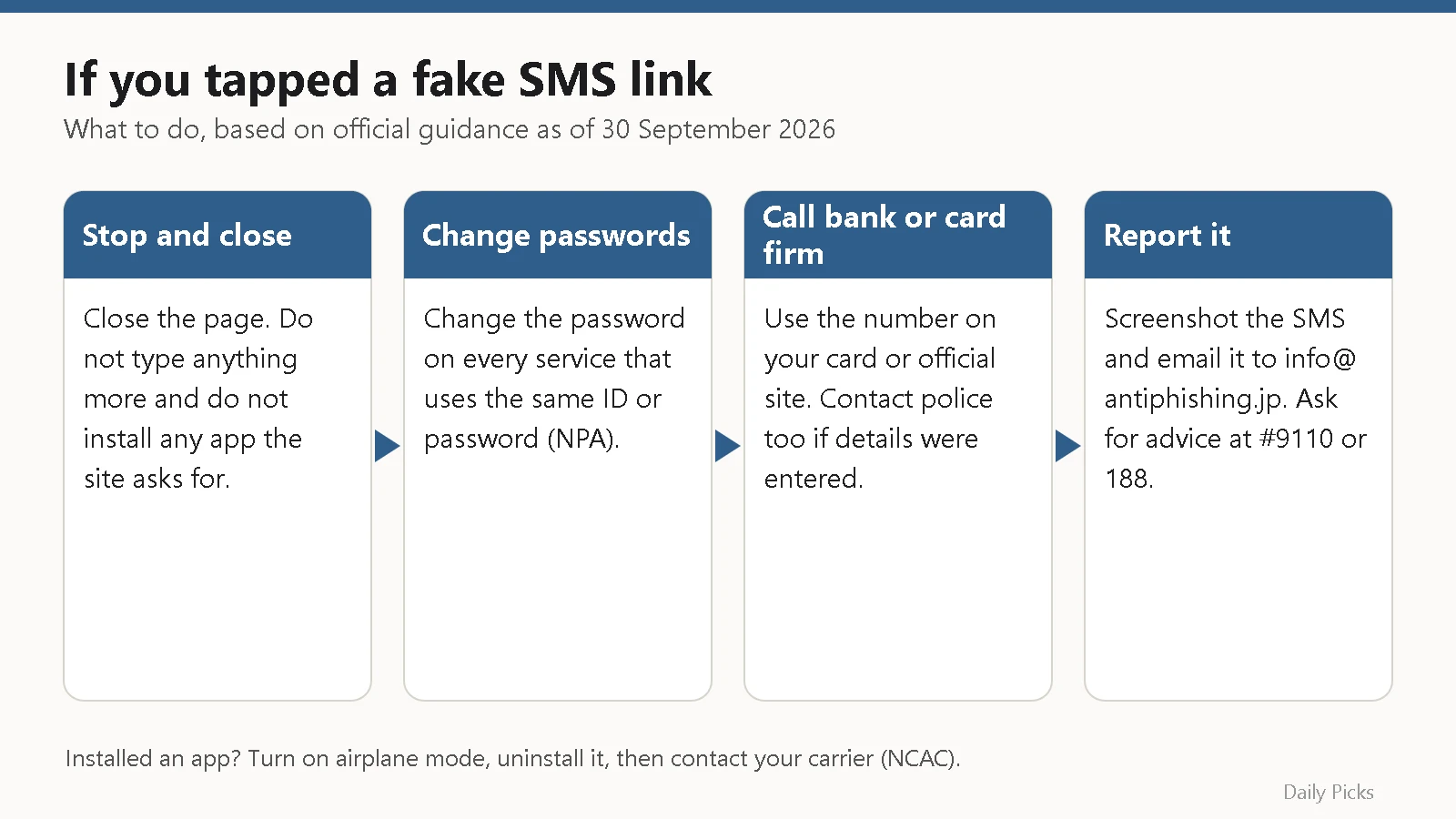
- If you tapped the link or entered details
- How to report a fake SMS
- Carrier SMS filters and phone settings
- Checklist: stay safe from fake SMS
- FAQ
- Related reading
- Sources
What smishing is and why it works
The National Police Agency (NPA) explains that criminals pretend to be mobile phone companies, delivery companies and financial institutions. They send a message with a link to a fake website that looks like the real one. The goal is to make you type in your ID, password, card number or other personal data.
The Ministry of Internal Affairs and Communications (MIC) says that tricks sending smartphone users from email or SMS to phishing sites are increasing. MIC also warns that many of these messages use shortened URLs, so you cannot see where the link goes just by reading it.
The Council of Anti-Phishing Japan says recent phishing is so well made that it is often very hard to tell from the real thing. The safer rule is simple: do not use the link in the message at all.
Common types of fake messages in Japan
The table shows types described on official pages. Example wording is translated from those pages.
| Type | Pretends to be | Example content (translated) | Official source |
|---|---|---|---|
| Missed delivery | Delivery company | “We came to deliver your parcel but you were out, so we took it back.” | NPA |
| Address problem | Japan Post | “Your parcel was not delivered because the address was unclear. Request redelivery here.” | Japan Post |
| Shipping fee | Japan Post | “Your order is being shipped. Please pay the delivery fee here.” | Japan Post |
| Bank security alert | Bank or other financial institution | A link to a copy of an internet banking login page | Japanese Bankers Association |
| Unpaid tax | National Tax Agency or tax office | Payment demands or warnings that your assets will be seized | National Tax Agency |
| Police | Police | Links to fake police websites, for example about a warrant or unpaid tolls or fines | NPA |
The NPA also shows an SMS pretending to be a large online shop. It says the account was locked because of an unauthorised login, with a link to “unlock” it. Messages like these try to make you worried or rushed.
What official organisations say they do not send
Delivery companies
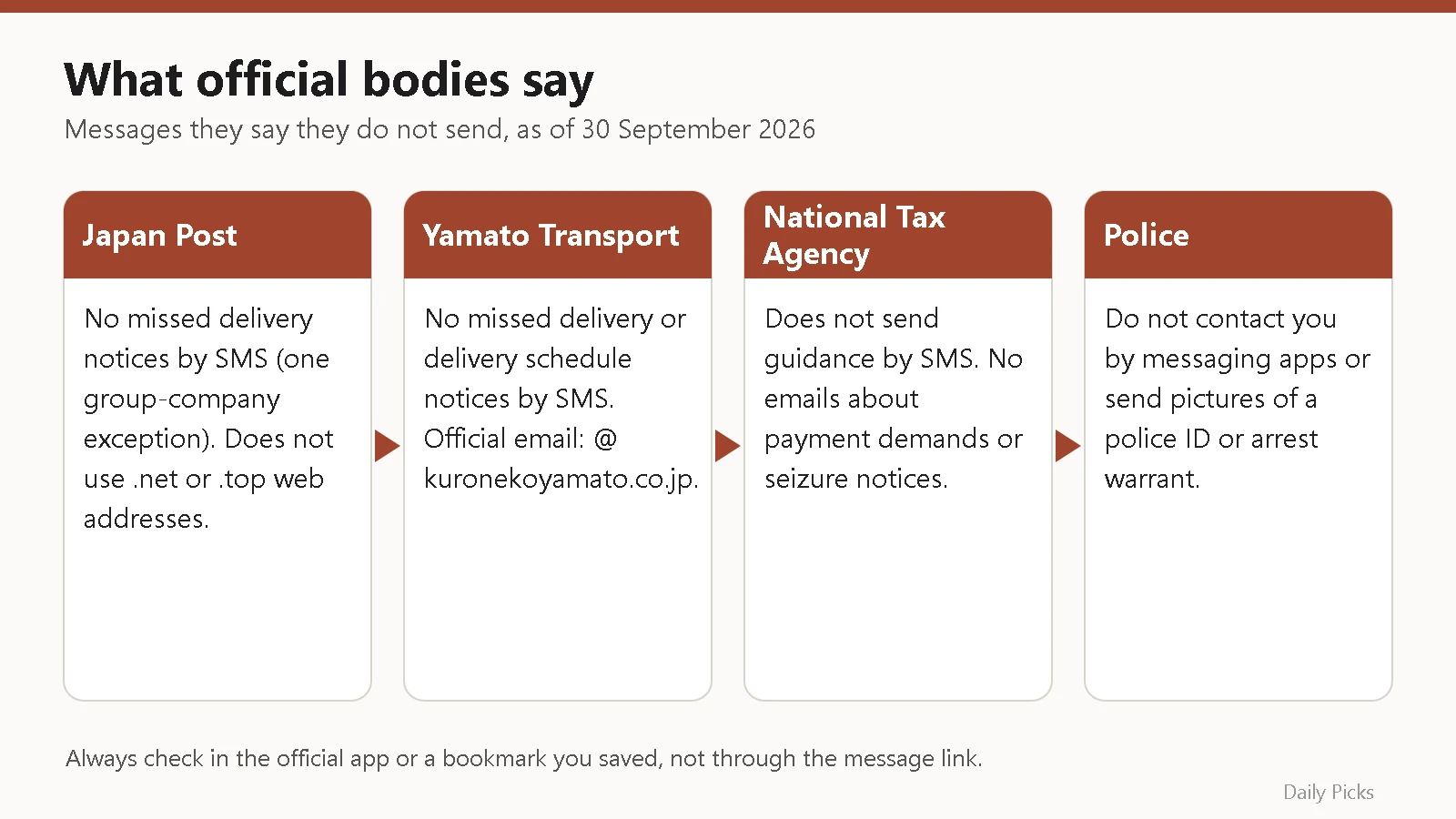
- Japan Post: The Japan Post Group says Japan Post does not send missed delivery notices by short message (SMS). Japan Post lists one exception: SMS sent by its group company Yubinkyoku Butsuhan Service when you were out for a delivery. Japan Post also says it does not use “.net” or “.top” in the web addresses it uses.
- Yamato Transport: In a notice dated 26 August 2025, Yamato lists missed delivery notices and delivery schedule notices by SMS among the messages it does not send. Its official emails use “@kuronekoyamato.co.jp”, but Yamato warns this domain is also faked.
- Sagawa Express: Sagawa says it sends delivery schedule notices by email and through its official LINE account. The official sender addresses are info-ptl@sagawa-exp.co.jp, info-nimotsu@sagawa-exp.co.jp and info@ds.sagawa-exp.co.jp. Sagawa’s page warns about contact that pretends to be from Sagawa.
Tax office, banks and police
- National Tax Agency: On its e-Tax site, the NTA says it does not send guidance by short message. This includes regional taxation bureaus and tax offices. It also says it does not send emails about payment demands or advance notice of seizure.
- Banks: The Japanese Bankers Association warns that criminals pretend to be banks and lead people to fake login pages. It asks you not to enter your ID, one-time password or security card numbers on a site you opened from a link in such an email or SMS.
- Police: The NPA says the police do not tell you by phone that you are under investigation. They do not contact you with messaging apps. They do not send pictures of a police ID or an arrest warrant.
Even when a real company does send SMS, the safe way is the same. Close the message. Then open the official app you normally use, or a bookmark you saved yourself, and check there. The Council of Anti-Phishing Japan recommends making this a habit.
Japanese words you will see
| Japanese | Reading | Meaning |
|---|---|---|
| 不在 | fuzai | You were not at home (missed delivery) |
| 再配達 | saihaitatsu | Redelivery |
| 未納 / 未払い | mino / miharai | Unpaid |
| 差押え | sashiosae | Seizure of assets |
| 本人確認 | honnin kakunin | Identity check |
| 不正ログイン | fusei roguin | Unauthorised login |
| 迷惑SMS | meiwaku SMS | Spam SMS |
| フィッシング | fisshingu | Phishing |
If you tapped the link or entered details
What to do depends on how far you went. This table is based on NPA, MIC, Japanese Bankers Association and National Consumer Affairs Center pages.
| What happened | Do this now | Then |
|---|---|---|
| Opened the link only, typed nothing | Close the page | Take a screenshot, report it, delete the SMS |
| Entered an ID and password | Change the password | Change it on every service that uses the same ID or password |
| Entered mobile carrier ID, PIN or code | Change the password | Lower the carrier billing limit or turn carrier billing off; contact the carrier |
| Entered bank login details | Contact your bank and the police | Check your account for transfers you did not make |
| Entered a credit card number | Contact the card company | Check statements; report to the police |
| Installed an app | Turn on airplane mode, then uninstall the app | Contact your mobile carrier and check your bill |
Passwords and accounts
The NPA says that if your ID or password may have been stolen, you should quickly change the password on all services where you use it.
Bank and card details
The Japanese Bankers Association says to contact the police and your bank at once. MIC’s cyber security site says that if your card number was stolen, you should check your bills and statements carefully and contact the card company. If the card company confirms misuse, it stops the card and issues a new one. MIC also says it is important to report the crime to the police. Use the number on your card or the official website, not one from the message.
A fake app
The National Consumer Affairs Center warns that some fake delivery messages make you install an app. The app can send the same SMS from your phone to many people. The Center advises turning on airplane mode and then uninstalling the app. It also advises setting your carrier billing limit low, or turning carrier billing off, because stolen carrier IDs and codes have been used for fraudulent carrier billing.
How to report a fake SMS
- Council of Anti-Phishing Japan: Send reports by email to info@antiphishing.jp. The Council says an SMS cannot be forwarded directly, so take a screenshot and attach it to your email.
- Phishing 110 (フィッシング110番): The NPA and prefectural police, such as the Tokyo Metropolitan Police Department, guide people to report phishing sites to the Internet Hotline Center (IHC). If you actually lost money, the Tokyo police ask you to consult your nearest police station.
- #9110: The police consultation number for non-emergencies. It works nationwide.
- 188: The consumer hotline. It connects you to a local consumer affairs centre.
- Your mobile carrier, bank or card company: For carrier billing, fake apps, bank transfers or card use you did not make.
If you are in danger or a crime is happening now, call 110.
Carrier SMS filters and phone settings
The NPA recommends using the spam message blocking functions offered by mobile carriers. The three large carriers list these functions on their official pages as of 30 September 2026.
- NTT Docomo: “SMS拒否設定” (SMS rejection settings), including 危険SMS拒否 (dangerous SMS rejection), 非通知SMS拒否, 国際SMS拒否, 国内他事業者SMS拒否 and 個別番号拒否. Docomo says dangerous SMS rejection has been applied automatically since 24 March 2022, except for some users who already use certain settings. You can change settings in My docomo.
- au (KDDI): “迷惑SMSブロック” (spam SMS block). au says it started on 15 February 2023, is free and is applied automatically with no sign-up. A separate app service, “迷惑メッセージ・電話ブロック”, is offered through Ponta Pass (548 yen a month).
- SoftBank: “迷惑SMSフィルター” (default: standard), “なりすましSMS拒否設定” (default: on), “URLリンク付きSMS拒否設定” (default: off) and “海外からの電話番号メール拒否設定” (default: off).
Stricter settings may also block real messages, such as login codes. Other carriers publish their own settings on their support pages.
iPhone
The Apple iPhone User Guide has a page on screening and filtering texts from unknown senders, and a page on reporting spam and blocking senders in Messages. Menus change with iOS versions, so follow the guide for yours.
Android (Google Messages)
Google’s help page explains two ways. In the conversation list, touch and hold the conversation, tap Block, then Report spam, then OK. Or open the conversation and tap More options, Details, Block & report spam, then OK. Google says a report sends the sender’s number and the last 10 messages from that sender to Google. The sender cannot see your report. You can also block without reporting.
Checklist: stay safe from fake SMS
- Do not tap links in unexpected SMS, even if the sender name looks real.
- Check deliveries, bank notices and bills only in the official app or a bookmark you saved.
- Remember: Japan Post and Yamato say they do not send missed delivery notices by SMS, and the NTA says it does not send guidance by SMS.
- Make sure your carrier’s spam SMS filter is on.
- Use a different password for each service and turn on one-time passwords where offered.
- Set your carrier billing limit to the amount you really need.
- If you entered details, change passwords and call your bank or card company using the number on the card or official site.
- Take a screenshot and report fake SMS to info@antiphishing.jp.
- Save #9110 and 188 in your contacts.
FAQ
Is every missed delivery SMS fake?
Not always, but be careful. Japan Post says it does not send missed delivery notices by SMS (with one stated exception for a group company). Yamato says it does not send them by SMS. Sagawa uses email and LINE. In every case, check the tracking number in the official app or website instead of using the link.
I got an SMS saying I have unpaid tax. Is it real?
The National Tax Agency says it does not send guidance by SMS, including from tax offices. It also says it does not send emails about payment demands or seizure notices. If you are worried about your taxes, contact your tax office using details from the official NTA website.
My friends got strange SMS from my number. Why?
The National Consumer Affairs Center says a fake app can send SMS from your phone to many people. Turn on airplane mode, uninstall the app, then contact your mobile carrier and check your bill.
The site shows a padlock icon. Does that mean it is safe?
No. The Council of Anti-Phishing Japan says phishing sites can easily get a certificate, so a padlock can appear on a fake site too. The sender name and address can also be faked. Open the service from your usual official app or your own bookmark instead.
Related reading
- Missed delivery slip: how to request redelivery in Japan
- Sending parcels in Japan: Yu-Pack, Yamato and konbini
- Opening a bank account in Japan
- Emergency numbers in Japan: 119, 110 and #7119
Sources
- Phishing countermeasures (Japanese) – National Police Agency
- Beware of fake police fraud (Japanese) – National Police Agency
- Tricks leading to fake police websites (Japanese) – National Police Agency
- Phishing 110 (Japanese) – Tokyo Metropolitan Police Department
- What is phishing? (Japanese) – Ministry of Internal Affairs and Communications
- My credit card number was stolen (Japanese) – Ministry of Internal Affairs and Communications
- Reporting phishing (Japanese) – Council of Anti-Phishing Japan
- What is phishing? (Japanese) – Council of Anti-Phishing Japan
- Beware of fake missed-delivery SMS from delivery companies (Japanese) – National Consumer Affairs Center of Japan
- Beware of suspicious short messages and emails (Japanese) – National Tax Agency e-Tax
- Phishing emails and SMS pretending to be banks (Japanese) – Japanese Bankers Association
- Phishing fraud (Japanese) – Japanese Bankers Association
- Beware of suspicious calls, emails, SMS and fake websites (Japanese) – Japan Post Group
- Beware of suspicious emails and fake websites pretending to be Japan Post (Japanese) – Japan Post
- Spam emails using the Yamato Transport name (Japanese) – Yamato Holdings
- Receiving delivery schedule notices (Japanese) – Sagawa Express
- SMS rejection settings (Japanese) – NTT Docomo
- Preventing spam SMS (Japanese) – au (KDDI)
- Spam measures for S!Mail (MMS) and SMS (Japanese) – SoftBank
- Screen and filter texts on iPhone – Apple Support
- Report spam and block senders in Messages on iPhone – Apple Support
- Report spam in Google Messages – Google Help
コメント